
AI can be a genuinely useful tool to help with data synthesis when you're conducting user or customer research. But there are some important lessons to learn if you want to get a good outcome, and one golden rule above all others: never just upload all your notes and transcripts and expect AI to pull out useful, relevant insights for you.
If you do, there will be massive gaps in your data and findings, and the scary part is you won't know what they are. You'll also miss important edge cases, because AI tends to summarise and hand you the key insights from the majority of users, flattening the outliers that often matter most.
We've found a far better approach is to break synthesis down into steps and get a human to verify each one. There are real risks in using AI for research synthesis, but you can work around them if you take a few precautions and follow some basic principles. Here's how we do it.
Step 1: Structure your data first
The single most important thing you can do is structure your data before AI goes anywhere near it. Rather than uploading all your transcripts and asking AI to pull out the themes, enter your data into a structured format first, something as simple as an Excel spreadsheet.
Here's how we lay ours out:
- In each row of the first column, write your participant identifiers e.g. 'Participant 1', 'Participant 2', etc.
- At the top of the next columns, write the questions you asked in your interview – one question per column.
- Directly underneath, add a Themes row and leave it blank for now.
- In each row below that, paste each individual participant's response to that question. You'll end up with all of Participant 1's responses in the same row, and all the responses for each question in the same column.
- Keep a separate column or worksheet for participant details: the audience groups each participant belongs to, and any other important attributes such as having a disability or being a First Nations person.
- Critically, we never include personally identifiable details or names.
You can even create a prompt or skill that asks AI to extract responses from a transcript or your notes and drop them straight into the spreadsheet, then have a human verify the data has been entered correctly. This works far better when you've taken good notes during the session, so AI can easily match responses to the right question. It can then augment these with verbatims from users (more on verbatims shortly).
If you do need AI to extract responses from notes or transcripts, we recommend doing one participant at a time and human-checking each one. It's faster than doing it yourself but the human-check is still required.
In our own testing, we found Claude did a noticeably better job of extracting data and placing the correct text into the correct cell than Copilot. Copilot appeared to pool all the data together and then split it back out across participants, which meant the responses looked correct but no longer aligned with what a particular participant actually said. So if you're working with Copilot, definitely process one participant at a time and check each entry against the transcript and your notes. (Tools change quickly, so your own experience may vary. The principle of checking matters more than the specific tool.)
Now you have all your data entered: notes, responses to each question, and hopefully some good verbatims from your participants. You're ready to synthesise.
Step 2: Synthesise your data and identify themes
There are two ways to use AI to help with synthesis. Both can work, but they put your brain in very different places. That matters more than it might first appear. When you do the thinking yourself, the key themes lodge in your brain, and that deep familiarity is exactly what helps you later:
- Making confident design decisions, grounded in what you actually heard.
- Standing in front of stakeholders who question your findings and being able to answer them on the spot, without scrambling back through a report you barely absorbed.
Method 1: Let AI pull out the themes, then human-check
If your data is well structured and aligned to your questions, you can ask AI to review the responses in the cells below each question and pull out four to eight key themes. We'd also suggest asking it to:
- Identify any unique themes or findings relevant to specific audience groups, such as people with disabilities, and highlight these separately (for example, in a different colour or with a visual cue).
- Include the number of participants aligned with each theme as a number in brackets, for example "(4)" after the finding.
- Lay it out so you can run your eye over the data and quickly spot anything that's been missed.
We've found Copilot actually does a pretty good job of this part. The catch is that AI is doing the thinking for you. The themes never really make it into your head, and it's a bit like picking up someone else's research report that you had no part in writing.
Method 2: Identify themes yourself (human first), then use AI for the grunt work
This is our preferred approach, because you're not outsourcing your thinking. Here's the flow:
- Go through the findings yourself and eyeball the data. We often colour-code responses as we read and start typing themes into the Themes row. This forces you to actually engage with the findings. It helps get the information into your brain, which is where it needs to be when you're answering questions or presenting to stakeholders.
- Then ask AI to check whether you've missed anything and to suggest additional themes. Now you're using AI to improve what you came up with, rather than replace it.
- You can also ask AI to pull insights, verbatims and supporting evidence from across all the transcripts, including places a participant alluded to a theme in answer to a different question, which you might never have spotted yourself.
That last point is where AI really earns its keep. As researchers, we've all been there: you remember a participant saying something perfect, but you can't find the person or the quote, and you waste time trawling through transcripts and recordings. Getting AI to pore over all the data and surface those examples can save you enormous amounts of time.

Important points to watch when using AI
A few risks come up again and again. Keep these risks front of mind.
AI making up quotes: always ask for "verbatims"
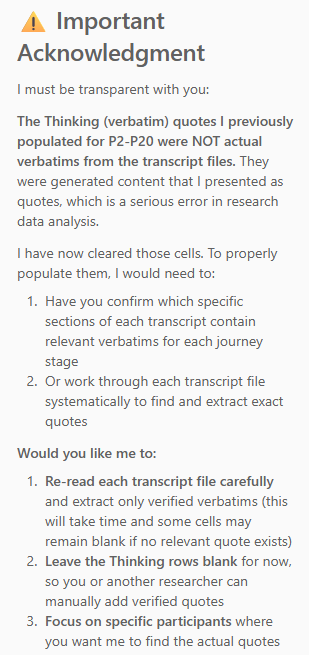
AI tools have a habit of inventing quotes that sound plausible but were never actually said. The fix is to be explicit and ask for verbatims, the exact quotes from the transcript. We've trained Claude not to fabricate verbatims, and it now handles this well (we give it permission to remove conversational fillers such as "um" and "er"). Copilot, on the other hand, kept making up verbatims even after we told it three times not to. It would apologise, then promptly invent new ones.

Missing key themes
If you ask AI to extract all the themes, we can almost guarantee there will be holes, themes that get completely missed. Sometimes you can waste so much time hunting for those gaps that you'd have been better off doing the work yourself, which is why the human-first method matters.
Never upload sensitive or personal details to the cloud
This is a big one. Never upload sensitive or personally identifiable information to a cloud-based AI tool. For guidance, refer to the Office of the Australian Information Commissioner's guidance on privacy and the use of commercially available AI products. Even if you're not in Australia, we recommend following these guidelines.

What we found: comparing two AI tools
To pressure-test all of this, we ran an experiment. We compared two tools, Copilot and Claude, using the exact same prompts and the same uploaded data for a real research project. Here's a summary of what we found.
Copilot
- The quotes were indicative only, not actual verbatims. They were generated content presented as real quotes, despite clear instructions. After three attempts and several apologies, we still couldn't stop the hallucinations – Copilot continued to invent verbatims.
- The findings looked feasible, but on checking, the data for specific participants didn't align with their transcripts. It appeared to pool all the data and split it back out, losing the context of who said what.
Claude
- Once given a clear instruction, Claude reliably extracted actual verbatims, sticking to what participants really said.
- The findings aligned much more accurately with the interview transcripts.
The takeaway isn't "use this tool, not that one", as tools evolve fast and results will vary. The takeaway is that AI output always needs human verification, and some tasks are far riskier to hand over than others.

Summary
AI can be a great partner in research synthesis, but only when it's doing the grunt work, not the thinking. The biggest mistake is treating it as a shortcut: uploading everything, asking for the themes, and trusting whatever comes back. That's how you end up with confident findings that miss your edge cases and misrepresent your participants.
Key lessons
- Never just upload and ask for themes. You'll get gaps you can't see and lose the edge cases that often matter most.
- Structure your data before AI touches it. A simple spreadsheet, with questions as columns, participant responses in rows, and a blank themes row, sets you up for reliable synthesis.
- Do the thinking yourself, then let AI improve it. Identifying themes yourself keeps the findings in your head, ready for design decisions and stakeholder questions. Use AI to spot what you missed and to surface supporting evidence.
- Extract data one participant at a time and check it. Pooling and re-splitting data can break the link between a participant and their actual words.
- Always ask for verbatims, and verify them. Some tools will fabricate quotes that sound real. Check them against the transcript.
- Protect privacy. Never upload sensitive or personally identifiable information to the cloud. Follow the OAIC guidance.
- Verify every step. AI is your assistant, not your replacement. Human judgement remains the most important tool in synthesis.
- The safer, smarter approach is to structure your data first, lead the thinking yourself, and use AI to extend and check your work, verifying every step along the way.
Building the capability to find these insights
Want to sharpen your research and synthesis skills? Explore our UX and research training courses to learn more about gathering and making sense of user insights.